- Home
- Shop All Products
- All Garage Door Remotes
- All Gate Remote Controls
- Tilt Garage Door Parts & Handles
- Sectional Garage Door Parts
- Tilt Garage Door Springs
- Buy Garage Door Motors DIY
- Garage Door & Gate Keypads & Wall Buttons
- Garage Door And Gate Receivers
- Acdc Garage Door Remotes
- Ads Dominator Garage Door Remotes
- Aprimatic Gate Remotes
- Ahi Garage Door Remotes
- ATA Garage Door Remotes & Keypads
- Avon Smartdoor Garage Door Remotes
- B&d Garage Door Remotes
- BENINCA Gate Remotes
- Bft Garage Door & Gate Products
- Boss Garage Door Remotes
- Came Garage & Gate Remotes
- Casar Garage Door Opener Remotes
- Centurion Gate & Garage Door Products
- Centsys Gate & Garage Door Remotes
- Chamberlain Garage Door Remotes
- Cloning Garage Door Remote
- conqueror garage door remotes
- Dace Gate Remote Controls
- DEA Gate Remote Controls
- Defender Garage Door Remotes
- Digi Code Garage Door Remotes
- Ditec Gate & Garage Remotes
- Dominator Garage Door Remotes NZ
- DoorHan Gate Remotes
- Doormate Garage Door Remotes
- Doorworks Garage Door Remotes
- Easy Lifter Garage Door Remotes
- ECA Gate & Garage Door Remotes
- Elsema Garage Door & Gate Remotes
- ET Door Opener Remotes
- FAAC Gate Remote Controls
- Force Garage Door Remotes
- Garageace Garage Door Remotes
- Fushi Garage Door Remotes
- Garador Garage Door Remote Controls
- Genius Gate Remote Controls
- Gibidi Replacement Remotes
- Gliderol Garage Door Remotes
- Grifco Garage Door Remotes
- Guardian Garage Door Remote Controls
- King Kong Doors Remotes
- Lees Technology Garage Door Remotes
- Liftmaster Garage Door Remotes
- Lockmaster Garage Door & Gate Remotes
- Merlin Garage Door Remotes & Keypads
- Mhouse Garage & Gate Remotes
- Motorpol Garage Door Remotes
- Motorlift Garage Door Remotes
- Motostar Gate Remotes
- Nice Garage & Gate Remotes
- Orbit Garage Door Remotes
- ORCA Garage Door Remotes
- Parker Garage Door Remotes
- Remote King garage & Gate Remotes
- Rib Gate & Garage Door Remote Controls
- Securalift Garage Door Remotes
- Smart Openers Garage Door Remotes
- Sommer Remote Controls
- Sovereign Garage Door Remotes
- SuperLift Garage Door Remotes
- Steel-Line Garage Door Remotes
- Tau Gate Remote Controls
- Tiltamatic Garage Door Remotes
- Tmt Automation Gate Remotes
- Troytec Garage Door Remotes
- Vergo Garage Door Opener Remote
- Vaskeri Garage Door Remotes
- V2 Phox Garage Door & Gate Remotes
- Windsor Garage Door Remotes
- Remote Control Sun Visor Holders
- Garage Door Motor Parts
- Services We Offer In Auckland
- DEA Gate Remote Controls
- T&C
- Shop By Motor Head
- Contact Us
- Our Easy Remote Coding Videos
- Helpful Information
- Customer Testimonials
- FAQS
- About Us

ECA Gate & Garage Door Replacement Remote - ECA Gate & Garage Door Remotes
ECA Gate Remote Control
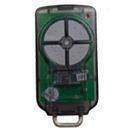
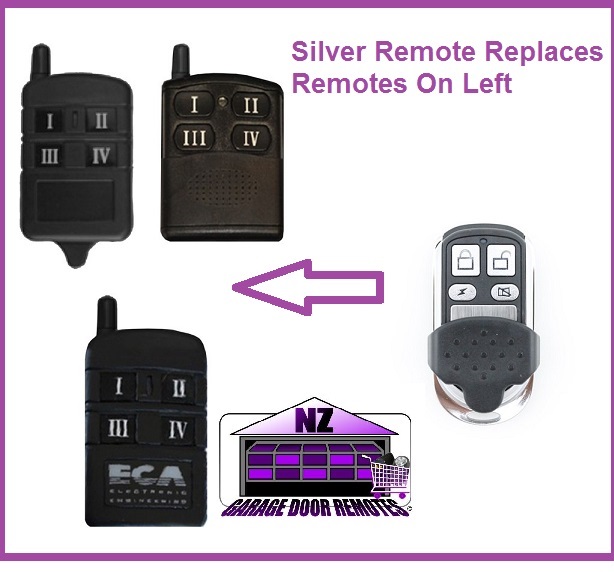
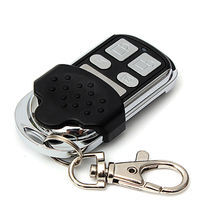
This ECA Remote Is Now Relpaced By Our Nice And Small Silver And Black Remote With Sliding Cover compatible remote. 81CR 82CR 84CR ARC-6 Not Compatible if your remote has RED roman numerals Please note: This remote is not suitable for ECA receivers installed after 2016 Please ensure that your original remote is pictured and your receiver model number is listed to ensure compatibility.
Price:
NZ$ 74.00 including GST
NZ$ 64.35 excluding GST
Price for 2+:
NZ$ 70.00 per item
Price for 3+:
NZ$ 65.00 per item
or four payments of $18.50
with  Learn More
Product Code:
ECA Remote
Rating:
Information
compatible remote.
81CR
82CR
84CR
ARC-6
Not Compatible if your remote has RED roman numerals
Please note: This remote is not suitable for ECA receivers installed after 2016
Please ensure that your original remote is pictured and your receiver model number is listed to ensure compatibility.
Specifications
ECA TX4 Replacement Remote Control
Coding Instructions
ECA TX4 REMOTE
CODING INSTRUCTIONS
CODING VIA A WORKING REMOTE
Take the operational remote control of the unit and stand about 2m from
the receiver.
Press and hold both the buttons (III) and (I) simultaneously for 10 seconds
or till the program LED turns ON to indicate that the receiver is ready to
learn the new remote control’s button.
Press and hold the one of the buttons Padlock Closed Or Padlock Open of the NEW
remote control for 10 seconds or till the program LED turns off.
The LED light will turn off to indicate that the remote button has been learned into the receiver’s memory.
CODING VIA THE RECEIVER
1. Remove the jumper “Teach / Clear” in the receiver and the program LED light will turn on.
2. Press and release the button on the new remote control, which you would like to operate the receiver till the LED
light turns off, (about two seconds).
3. Return the “Teach / Clear” jumper to its place. 4. Repeat steps 1- 4 for teaching more remote controls.
DELETING REMOTES
1. Disconnect the power supply from the receiver and remove the “Teach / Clear” Jumper in the receiver.
2. Wait for 5 seconds and reconnect the power supply. The program LED light will turn on in the receiver.
3. Return the jumper “Teach / Clear “ to its place immediately before the LED light turns off.
4. The LED will flash twice to indicate that all remote controls were deleted from the receiver’s memory.
Product Enquiry
View your shopping basket or Browse other items in ECA Gate & Garage Door Remotes.
|
© Copyright New Zealand Garage Door Remotes - Site Map Phone: 0211724470 Auckland New Zealand |